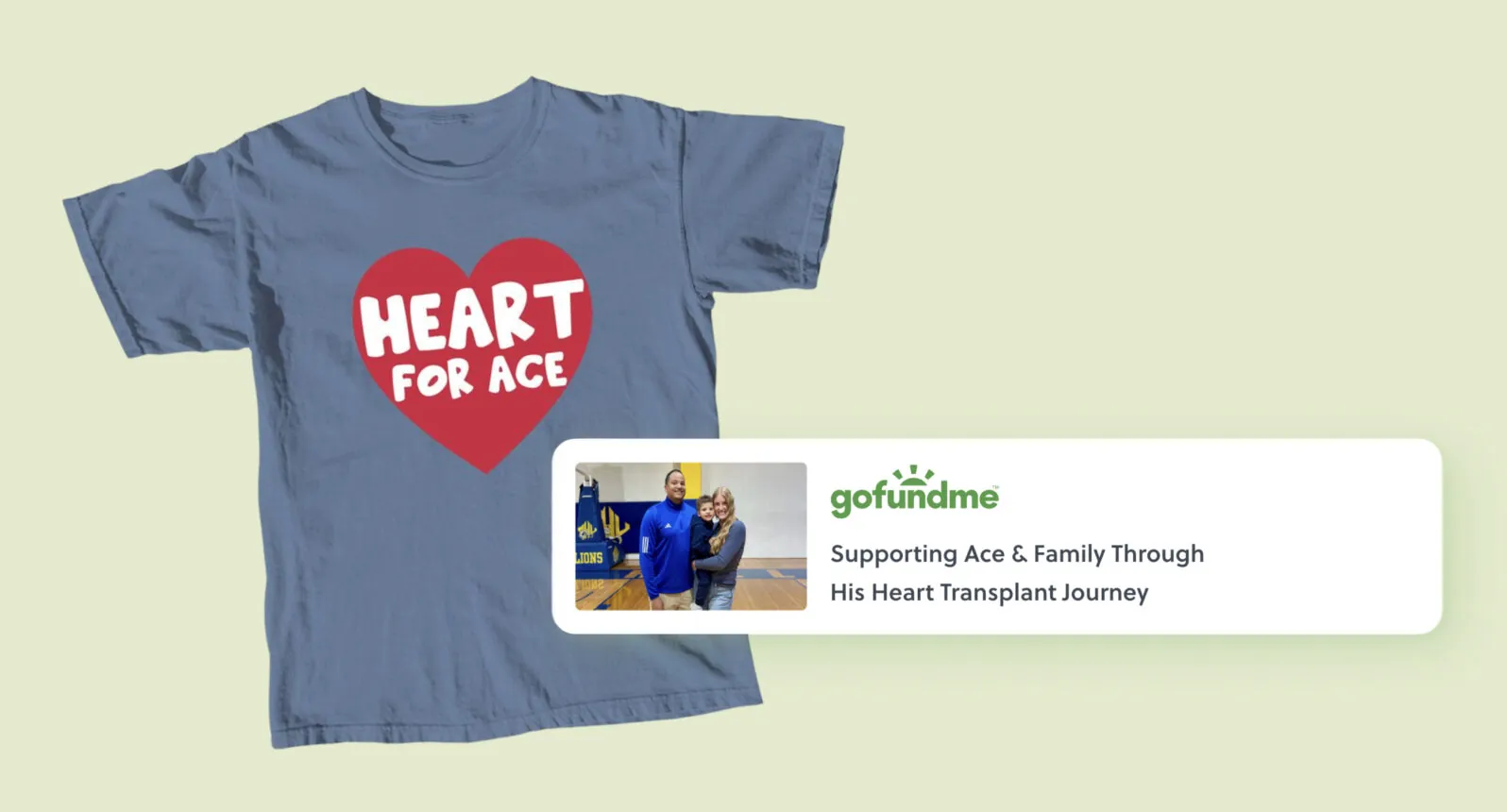
You’ve got a GoFundMe up and running — but donations aren’t the only way to rally your community. What if your supporters could buy a custom t-shirt and contribute at the same time? That’s exactly what Bonfire’s GoFundMe integration makes possible.
By linking your Bonfire t-shirt fundraiser to your GoFundMe page, you give supporters two ways to show up for your cause: donate directly or purchase a shirt they’ll wear to support you long after the fundraiser ends. It takes about 5 minutes to set up, costs nothing, and Bonfire handles all the printing, shipping, and customer service.
Here’s how to do it.
Why Add a T-Shirt Fundraiser to Your GoFundMe?
Donations are powerful — but a t-shirt gives people another way to support you, each and every time they wear it. Here’s why combining a t-shirt fundraiser with your GoFundMe works so well:
- Supporters get something tangible. When someone buys a shirt, they’re not just donating — they’re getting something they can wear and share. That feels different, and it motivates people to give who might otherwise scroll past a straight donation ask.
- Shirts provide encouragement and community. Every person who wears your shirt becomes a walking billboard for your campaign and its beneficiaries. It’s a beautiful picture of a supportive community to see all your supporters in their t-shirts.
- There’s zero financial risk. Bonfire is a print-on-demand platform, which means shirts are only printed when someone orders them. You never have to guess how many to make or worry about unsold inventory sitting in your garage.
- It keeps your campaign alive longer. GoFundMe campaigns often spike early and taper off. A t-shirt gives you something new to share, a fresh reason to post on social media, and a way to re-engage supporters who already know about and have given to your cause.
To learn how t-shirt fundraising with Bonfire works, check out the video explainer below:
What You’ll Need
Before you start, make sure you have:
- An active GoFundMe account with at least one published fundraiser
- A Bonfire account (free to create at bonfire.com)
- A Bonfire campaign that is set up as a fundraising campaign (not a standard selling campaign)
Step 1: Create Your Bonfire Campaign
Head to Bonfire and start a new t-shirt fundraiser campaign. The design tool is beginner-friendly, so you don’t need any design experience to get started.
You have a few options:
- Use what you already have. If you have a logo or existing artwork tied to your cause, upload it directly. Simple often works best.
- Start from a template. Bonfire offers hundreds of free design templates you can customize with your own text, colors, and imagery. It’s the fastest way to get something that looks polished without spending hours designing.
- Build something from scratch. If you want a fully custom design, you can create one using Bonfire’s design tool or other tools like Adobe Illustrator, or work with Bonfire Studio for more involved creative support.
Once you’re happy with your design, set your selling price. Bonfire lets you set your own selling price so you can find the right balance between raising funds and offering merch at a price that’s approachable to your community.
When you reach the campaign settings, make sure fundraising mode is enabled. This is what unlocks the GoFundMe integration — the connect option won’t appear on standard selling campaigns.
If you already have a campaign, you can edit it and enable fundraising from your dashboard.
Step 2: Connect Your GoFundMe Account to Bonfire
This is a one-time step. Once your accounts are linked, you can connect any of your GoFundMe fundraisers to any of your Bonfire campaigns.
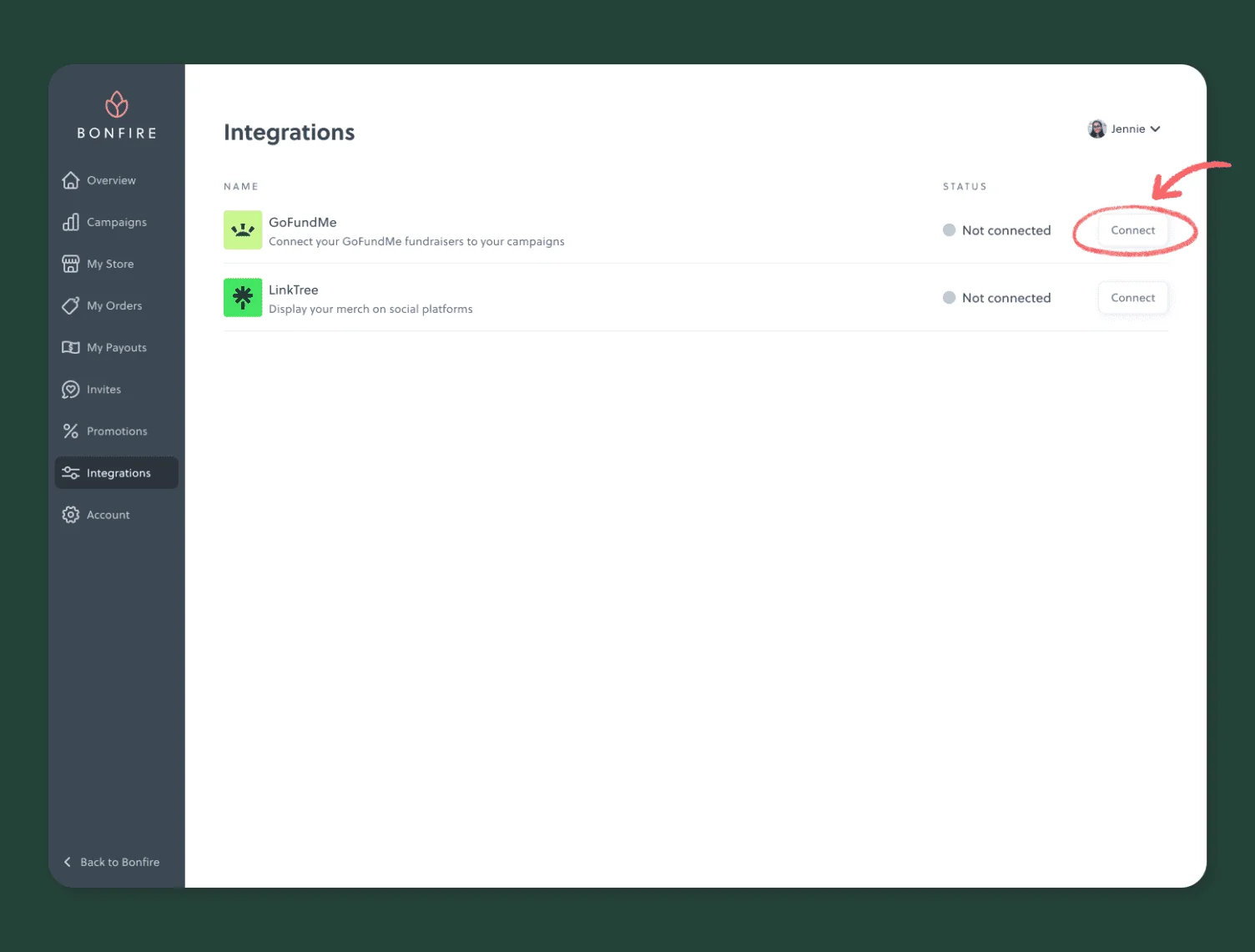
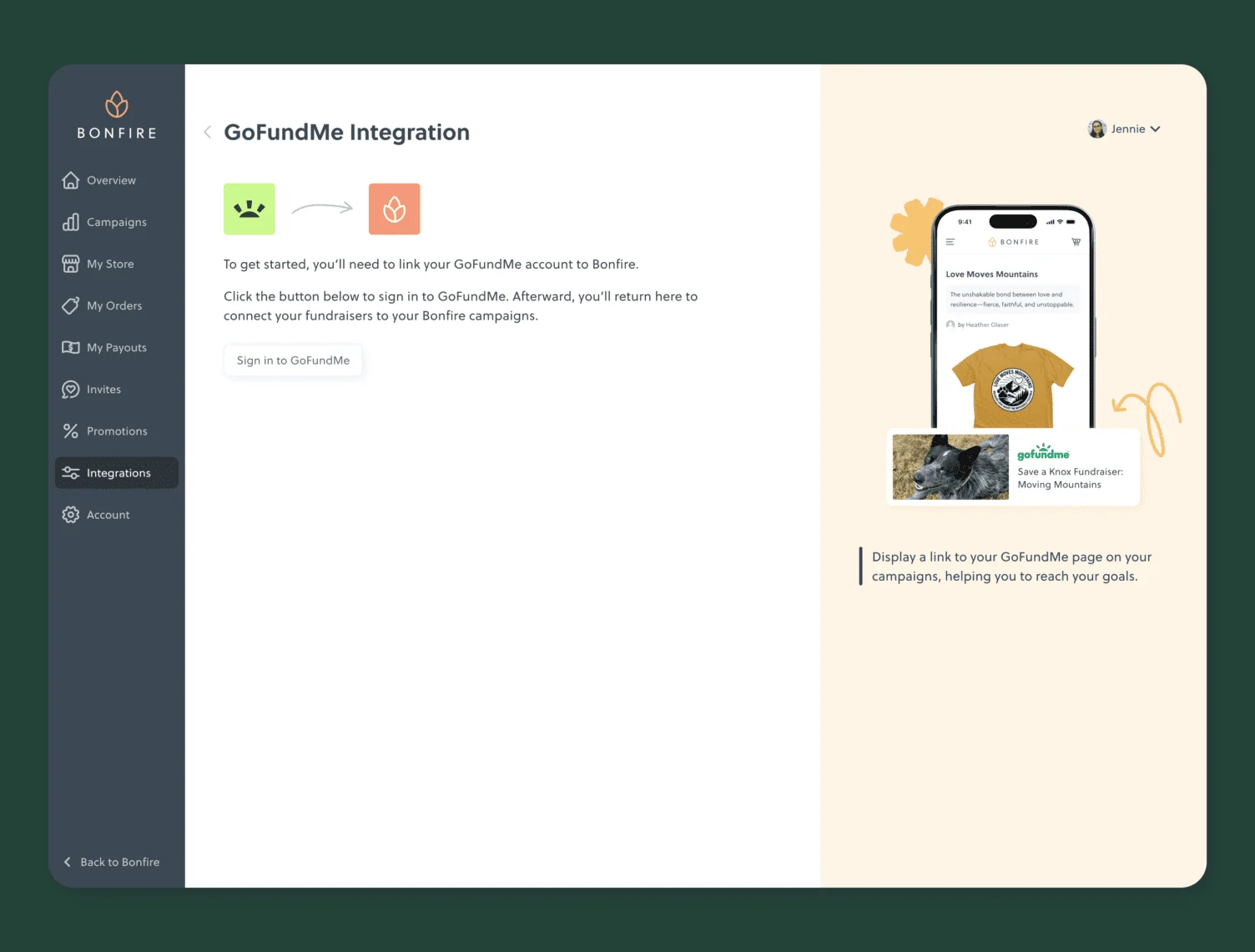
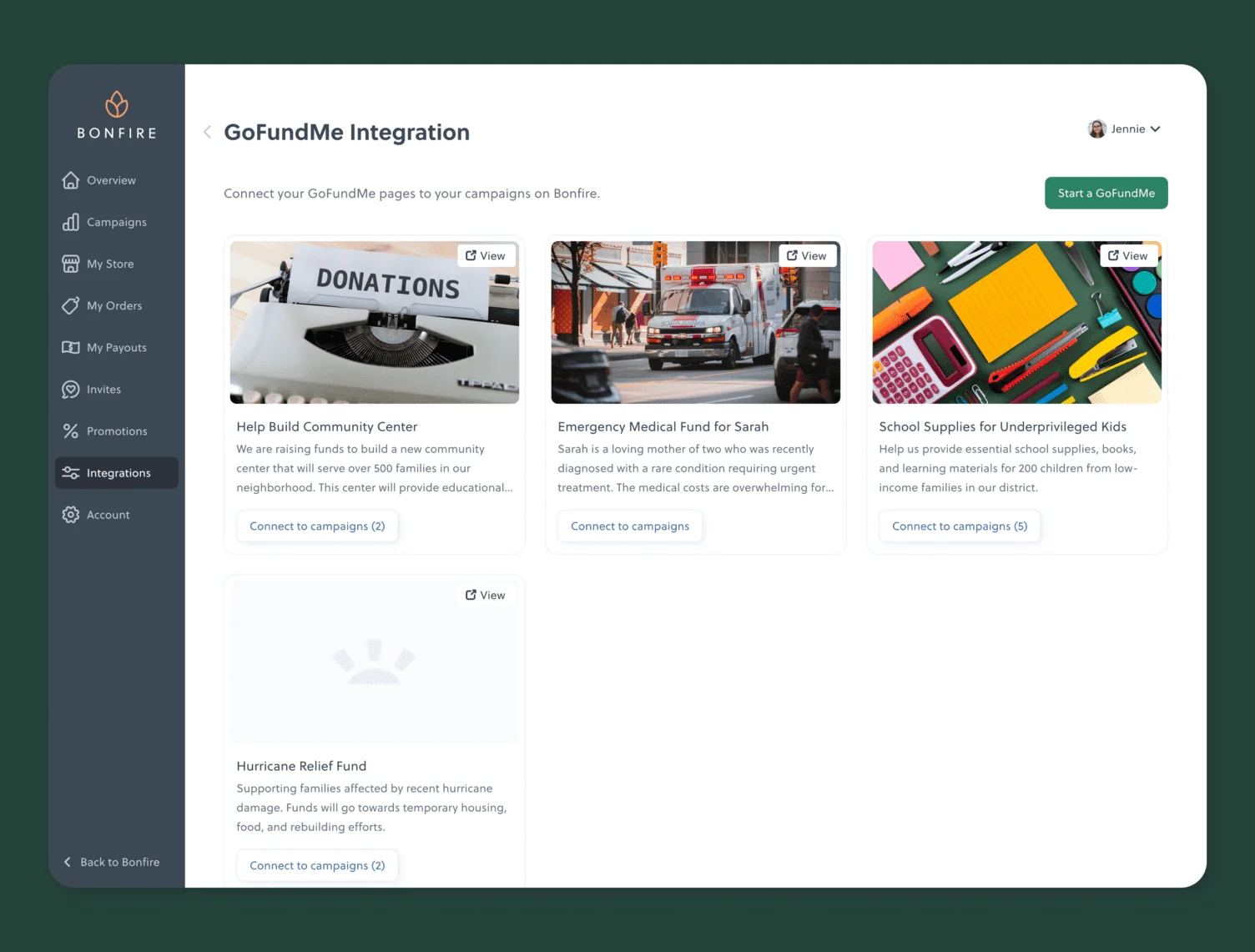
- Log in to your Bonfire account and go to your Dashboard.
- Navigate to Integrations in the sidebar.
- Find GoFundMe and click Connect.
- You’ll be prompted to sign in with GoFundMe — this opens a new tab where you’ll authenticate with your GoFundMe credentials.
- Once you sign in successfully, you’ll be returned to the Bonfire integrations page, where all your GoFundMe fundraisers will now be visible.
Your accounts are now connected.
Step 3: Link a GoFundMe Fundraiser to Your Bonfire Campaign
You can do this in two ways, depending on where you are in the process.
Option A: While Creating or Editing a Campaign
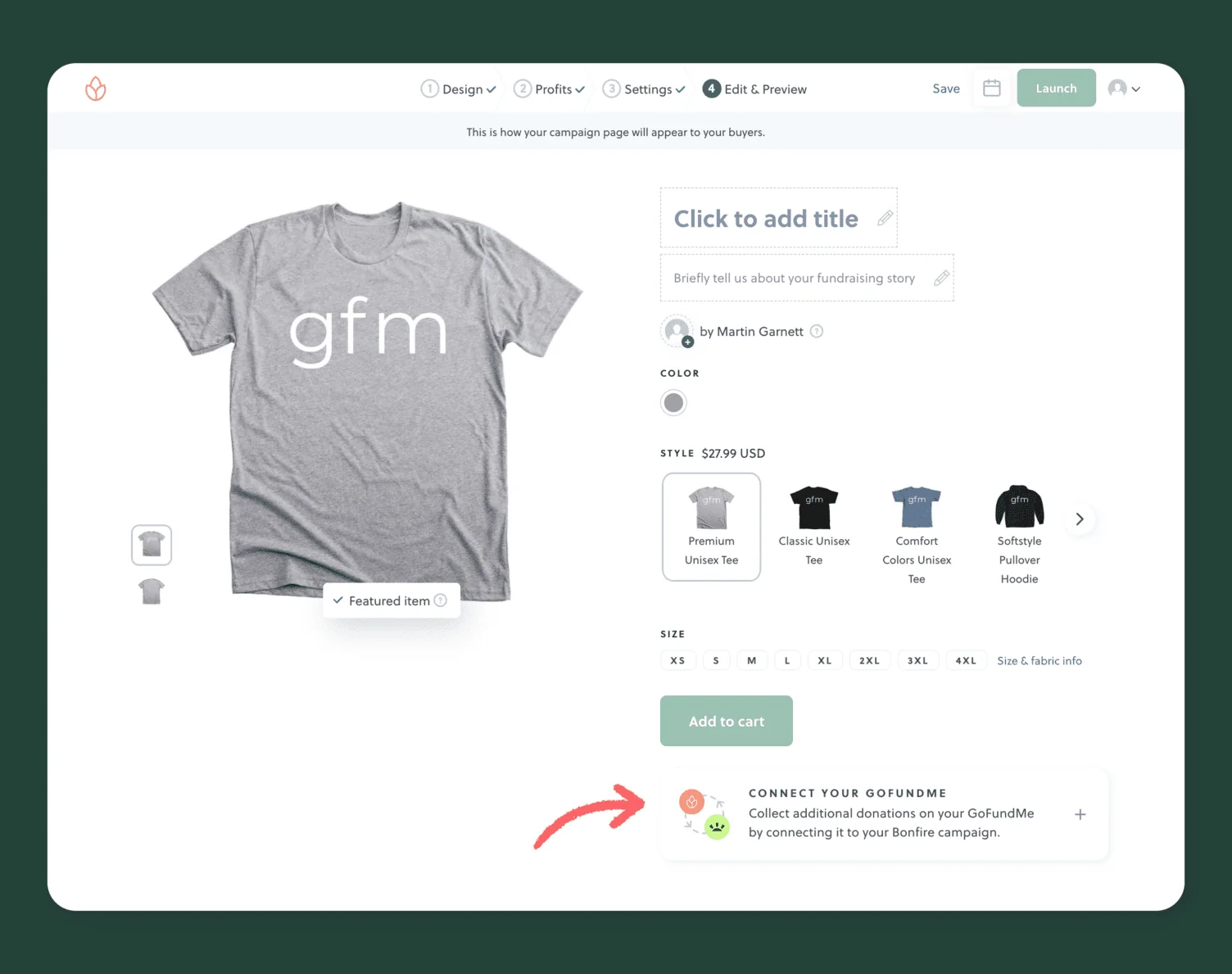
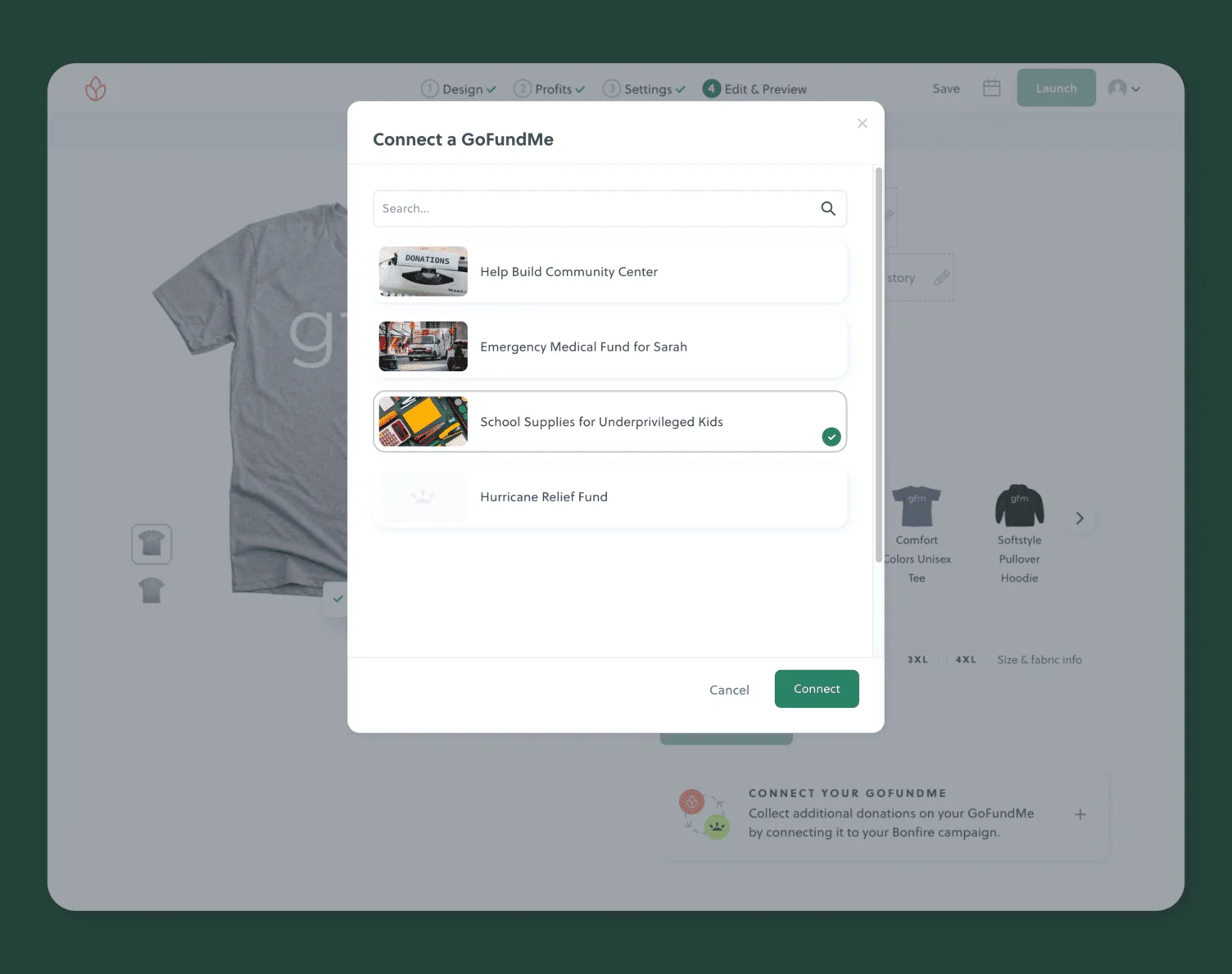
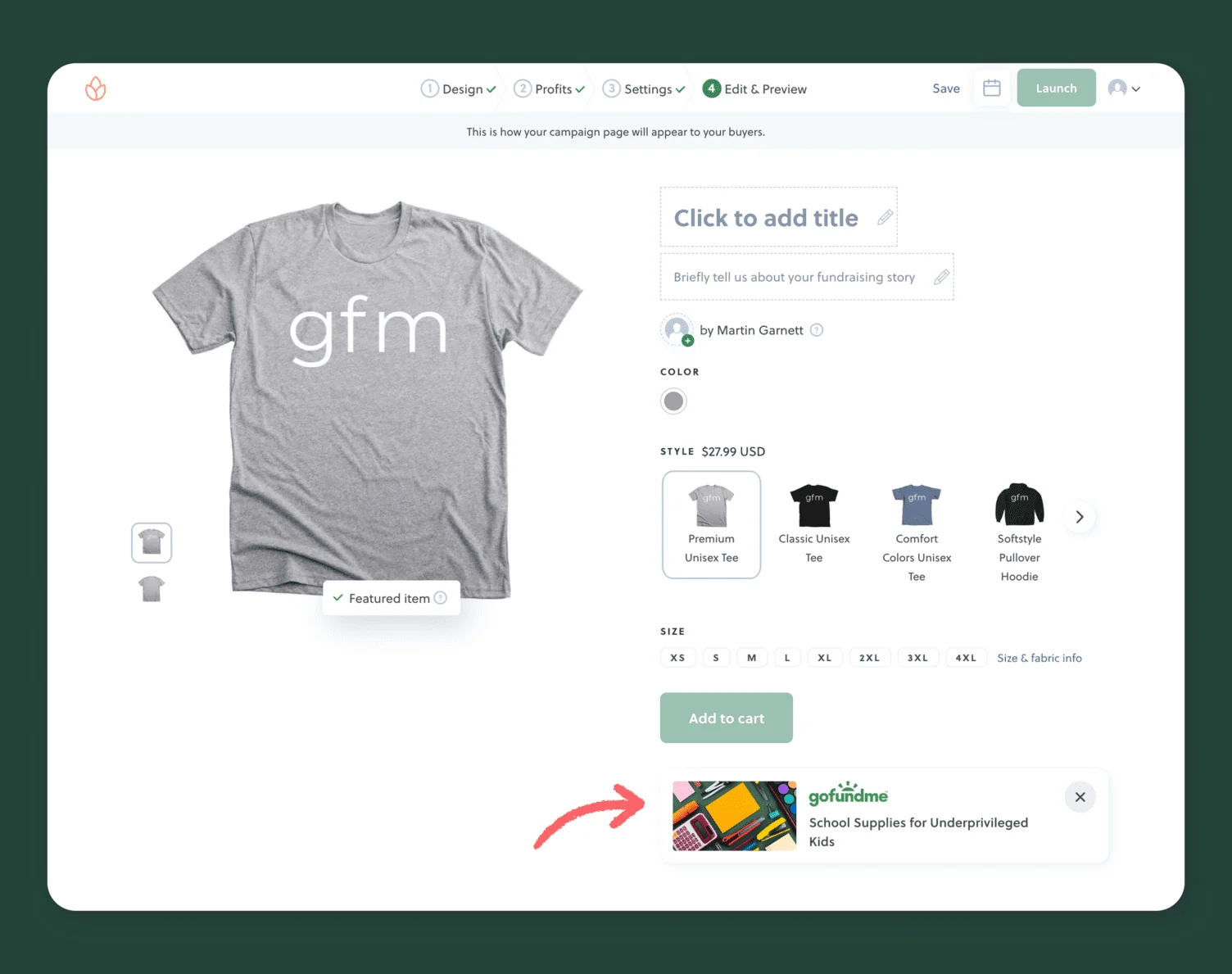
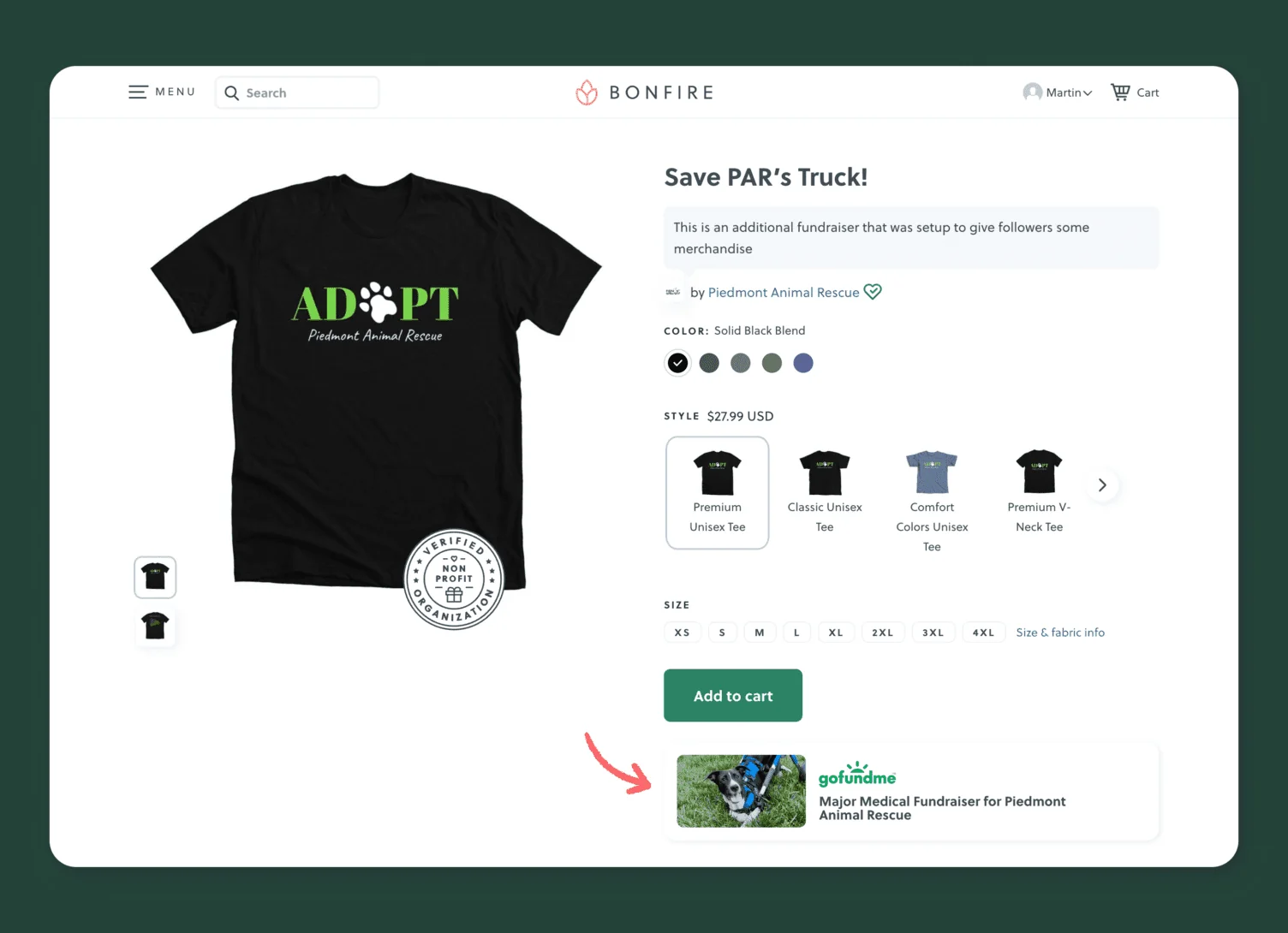
When you reach Step 4 of creating or editing a Bonfire campaign, you’ll see a preview of your campaign page. Just below the “Add to cart” button, there’s an option to connect your GoFundMe.
Click it, select the GoFundMe fundraiser you want to link, and hit Connect. You can only connect one GoFundMe fundraiser per Bonfire campaign. Once connected, the fundraiser will appear directly on your Bonfire campaign page.
To swap it out later, click the X to remove it and select a different fundraiser.
Option B: From the GoFundMe Integration Page
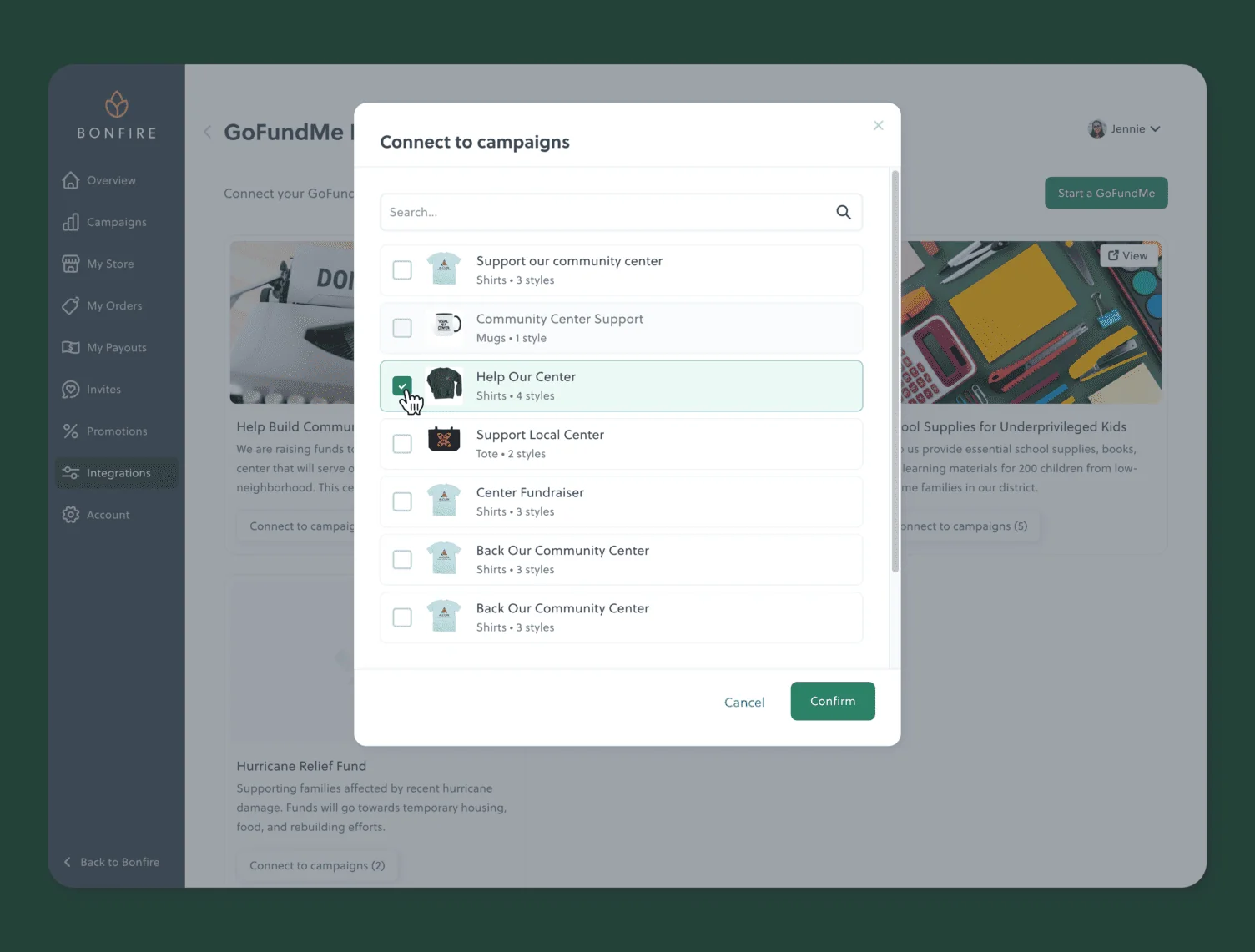
This option is handy if you want to connect multiple Bonfire campaigns to the same GoFundMe fundraiser at once.
- Go to the GoFundMe integration page in your Bonfire dashboard
- Find the GoFundMe fundraiser you want to connect to and click Connect to campaigns
- A list of your Bonfire campaigns will appear — campaigns that aren’t in fundraising mode will be greyed out
- Select the campaigns you want to link and click Confirm
If a number appears in brackets next to a fundraiser, it indicates how many Bonfire campaigns are already connected to it.
Step 4: Share Both Campaigns
Launching is just the beginning — now you need to spread the word. Here’s how to get the most out of running both campaigns simultaneously:
- Post on social media. Share your Bonfire campaign link wherever you already share your GoFundMe. Instagram, Facebook, TikTok, X — wherever your community is. Lead with the shirt design; visuals grab attention far better than a text-only donation ask.
- Add it to your GoFundMe updates. GoFundMe lets you post updates to your campaign page. Use these to mention your t-shirt campaign and link directly to Bonfire. Supporters who’ve already donated are often the most likely to buy a shirt, too.
- Tell people what they’re funding. Whether it’s in your GoFundMe update or your Instagram caption, share progress toward your goal. Let supporters know how close you are. Momentum is contagious — and knowing their shirt purchase pushes you closer to the finish line motivates people to buy.
- Ask buyers to share. When someone gets their shirt, ask them to post a photo wearing it and tag your campaign. User-generated content like this is some of the most powerful promotion you can get, and it costs nothing.
What Your Supporters Will See
Once everything is connected, visitors to your Bonfire t-shirt fundraising campaign page will also see a link to your GoFundMe fundraiser. This makes it easy for someone who finds your shirt campaign to also navigate to your donation page — and vice versa if you share your Bonfire link alongside your GoFundMe link.
Bonfire handles all fulfillment on its end: payments, printing, and shipping directly to your supporters. You receive your payout proceeds after each campaign batch closes.
What Happens When Your Campaign Ends
Once your Bonfire campaign closes, Bonfire takes it from there. Every merch order is printed and shipped directly to your buyers — you never touch the inventory. When fulfillment is complete, Bonfire sends you your full payout: 100% of the profits from shirt sales.
For any donations accepted through Bonfire, a small processing fee applies (8% for individuals, 3.5% for verified nonprofits). That’s the only fee Bonfire ever collects.
Your GoFundMe continues to run on its own timeline, and you can always reference your Bonfire campaign in GoFundMe updates even after the shirts have shipped — it’s a great way to show supporters what you accomplished together.
Tips for Getting the Most Out of Both Campaigns
- Tell one story across both pages. Use the same language, imagery, and campaign name on both your GoFundMe and Bonfire pages so supporters recognize they’re part of the same effort.
- Tie your design to your story. The more your shirt feels connected to your specific cause — not just a generic fundraiser design — the more meaningful it is for supporters to wear.
- Launch both campaigns close together. The more synchronized your messaging, the more momentum you’ll build. Launching your Bonfire campaign a week after your GoFundMe goes live is a great way to give your fundraiser a second wave of attention.
- Share the Bonfire link on your GoFundMe updates. GoFundMe lets you post updates to donors — this is a great place to mention the shirt campaign and link to it directly.
- Enable donations on Bonfire. Bonfire lets you accept optional donations at checkout, on top of shirt purchases. Turning this on means supporters can add a little extra without having to visit a second page.
- Set a clear end date. Bonfire campaigns run in batches. Letting people know when the campaign closes (“shirts ship after June 15”) creates urgency and encourages people not to wait.
See Our GoFundMe Integration in Action
Here are a few campaigns launched by Bonfire users who’ve paired their GoFundMe with a Bonfire t-shirt fundraiser using our integration. Each one shows how different causes can benefit from giving supporters a second way to contribute.
- Rhodes to Recovery – Leukemia Fight
- Together for #TeamJP
- Heart for Ace
- Mannie Support Squad Fundraiser
- Callie’s Heart Transplant Journey <3
Frequently Asked Questions
No. Connecting your GoFundMe account to Bonfire is free. Bonfire’s standard pricing applies to t-shirt sales (base product costs are built into what you charge), and GoFundMe’s standard terms apply to donations made there.
You can sell everything from t-shirts, hoodies, sweatshirts, long-sleeve tees, kids’ shirts, blankets, eco-friendly shirts, and hats. Explore our product catalog to see all available fundraising products.
You keep 100% of the profit from each product you sell. Bonfire covers production, fulfillment, and customer support costs, and the remaining profit goes to you.
Once your campaign batch has ended, you can request your payout from your Bonfire dashboard, and your funds are typically sent within 2–8 business days. If you’re running a print-on-demand campaign, you can request a payout the following business day after an order is placed.
The integration button only appears on fundraising campaigns. Make sure your campaign has fundraising mode enabled. Also, confirm you’ve already connected your GoFundMe account on the Integrations page — the option won’t appear until you do.
No — each Bonfire campaign can only be linked to one GoFundMe fundraiser at a time. You can remove the current connection and add a different one if needed.
The standard GoFundMe integration (this guide) is for individuals and anyone with a regular GoFundMe account. GoFundMe Pro (formerly Classy) is a separate platform for nonprofits that includes deeper data sync features, CRM integrations, and supporter attribution. If your organization uses GoFundMe Pro, refer to Bonfire’s Help Center for the nonprofit-specific setup.
Add A T-Shirt Fundraiser to Your GoFundMe On Bonfire
Running a GoFundMe and a Bonfire campaign side-by-side gives your supporters more ways to contribute — and gives your cause more visibility every time someone wears your shirt. Using the Bonfire GoFundMe integrations only takes minutes to set up, and once it’s done, both platforms work together without any extra effort on your part.